Your Linux server is being attacked right now.
Defensia installs in one command and starts detecting SSH brute force, web exploits, and scanner bots immediately. Blocks them automatically.
Get Started FreeFree plan includes 1 server. No credit card required.
$ curl -fsSL https://defensia.cloud/install.sh | sudo bash
✓ Agent installed in 28.4s
✓ SSH protection active
✓ Web firewall active
✓ Dashboard connected
Live protection feed
blocked 185.220.101.7 · brute force · ssh
blocked 45.83.64.11 · SQL injection · nginx
blocked 103.145.13.90 · scanner · ports
active protection · ON






This is happening on your server right now
Every Linux server gets thousands of attacks daily. Without visibility, you're flying blind.
Mar 13 03:14:02 srv sshd: Failed password for root from 185.220.101.7 port 43992
Mar 13 03:14:03 srv sshd: Failed password for root from 185.220.101.7 port 43992
Mar 13 03:14:05 srv sshd: Failed password for admin from 45.83.64.11
Mar 13 03:14:06 srv sshd: Invalid user oracle from 103.145.13.90
Mar 13 03:14:08 srv sshd: Failed password for ubuntu from 91.108.4.30
Mar 13 03:14:09 srv nginx: 45.83.64.11 "GET /wp-login.php" 404
Mar 13 03:14:10 srv nginx: 103.145.13.90 "POST /../etc/passwd" 404
Mar 13 03:14:11 srv sshd: Failed password for root from 185.220.101.7
… and 4,200+ more attempts today
Attacks per day, on average
The average unprotected Linux server receives thousands of brute-force and scanning attempts daily.
Time to first attack after deploy
Automated botnets find new servers within minutes of them going online.
Alerts from a default Linux install
Ubuntu, Debian, RHEL ship with no intrusion detection. You won't know until it's too late.
Up and running in 30 seconds
One command. No config files. No rules to write.
Install
Works on Ubuntu, Debian, CentOS, RHEL, Rocky, AlmaLinux, Fedora, Amazon Linux. No configuration needed.
Connect
Reads SSH logs
Reads web server logs
Monitors firewall
Agent → dashboard
Auto-detects your log files — nginx, Apache, auth.log. No paths to configure.
Protected
[BLOCKED] 45.95.147.21 — Brute force
[BLOCKED] 103.42.176.8 — SQL injection
[BLOCKED] 91.108.4.30 — Scanner
Attacks blocked automatically. See every event in your dashboard, in real time.
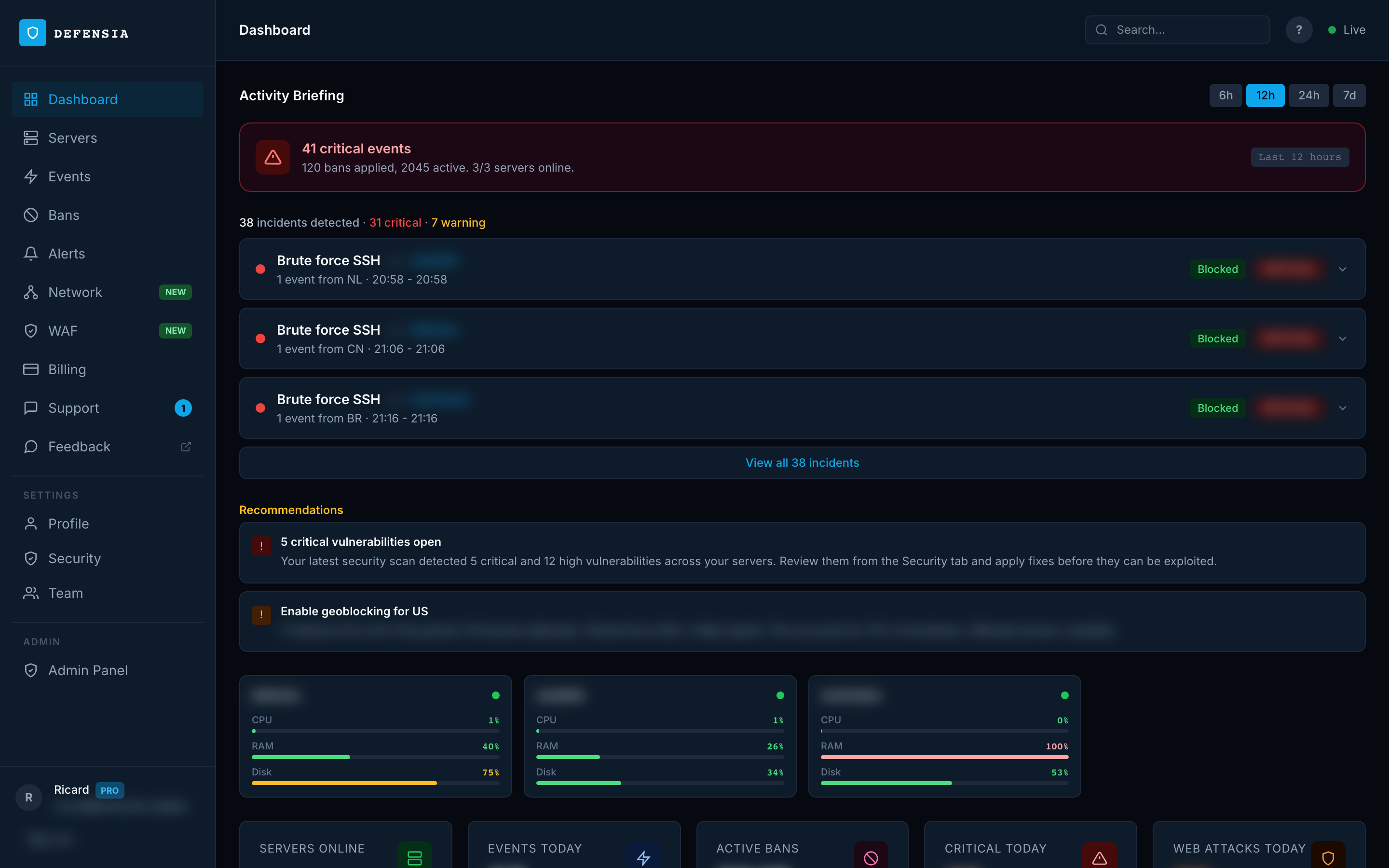
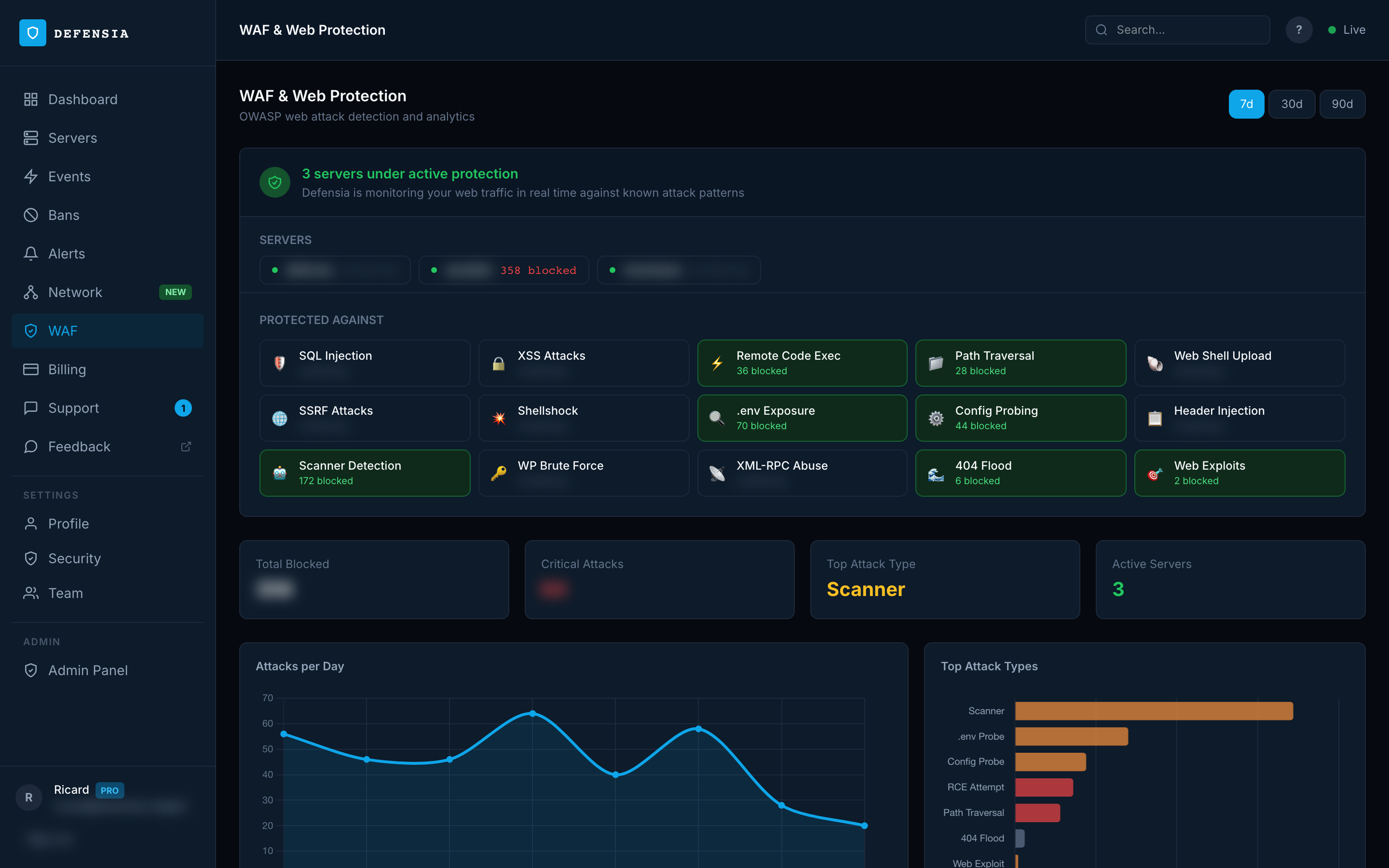
See every attack as it happens
Real data from a production server — blocked IPs, attack types, trends.
attacks per server, per day
detected and blocked automatically
malware signatures
MalwareBazaar + YARA rules
from install to first detection
one command, zero configuration
events processed, zero false blocks
cumulative scoring prevents single-request bans
"The average Linux VPS receives its first attack within 22 minutes of going online. By the end of day one, over 4,000 attempts — SSH brute force, web exploits, port scans. Most go undetected."
Based on Defensia agent telemetry across production servers running 64+ domains
"We've been running Defensia across our fleet for two months — over 80,000 bans, not a single legitimate user blocked. The scoring model is what makes the difference: one bad request doesn't trigger a lockout."
Infrastructure team — EU hosting provider, 20+ servers
Everything your server needs
All the security that would take days to set up manually — ready in under a minute.
Brute Force Protection
Detects SSH brute force, invalid users, and scanning patterns. Blocks automatically. Works with fail2ban or instead of it.
Web Application Firewall
Reads your Nginx/Apache logs. Detects SQL injection, XSS, path traversal, RCE, scanners, and 10+ more OWASP attack types.
Real-time Dashboard
See every attack as it happens. Event feed, charts, geographic origin, ban timeline — all servers in one view.
Security Scanner
Scans your server configuration and gives you a 0–100 security score. Every finding includes exact commands to fix it.
CVE & Vulnerability Alerts
Detects vulnerable packages on your server and matches them against NVD and CISA Known Exploited Vulnerabilities.
Geoblocking & Network Bans
Block entire countries from the dashboard. Bans detected on one server propagate instantly to all your servers.
Docker & Kubernetes Native
Deploy via Helm as a DaemonSet — each pod auto-registers as a server. Ingress WAF reads nginx-ingress logs to protect all cluster services. Detects pod crashes (CrashLoop, OOM) and audits NetworkPolicies.
Built for zero-trust environments
The agent only accesses auth logs and iptables. Here's exactly what it does — and what it doesn't.
Fully open source
The entire agent is MIT licensed on GitHub. Read every line before installing. No obfuscated binaries, no proprietary blobs. Every release is built by GitHub Actions CI — you can verify the checksum yourself.
Reads logs, nothing else
The agent reads /var/log/auth.log and web server access logs. That's it. No access to your application code, databases, environment variables, SSH keys, or user data. It uses a dedicated DEFENSIA iptables chain — your existing firewall rules are never touched.
You control what leaves your server
Only attack metadata is sent to your dashboard: attacker IP, attack type, timestamp. Raw log lines never leave your server. No telemetry, no analytics, no third-party data sharing. All communication is encrypted over TLS 1.2+.
Monitor free, block with Pro
The free plan runs in Monitor Mode — detect every attack, block nothing. Upgrade to Pro to enable Protected Mode, which auto-blocks attackers across all your servers. Uninstall is three commands: stop, remove binary, flush the iptables chain. No kernel modules, no cron jobs, no residual config.
How Defensia compares
Unlike fail2ban or CrowdSec, Defensia gives you a dashboard, WAF, and zero configuration.
| Feature | Defensia | fail2ban | CrowdSec |
|---|---|---|---|
| Install time | ~30 seconds | ~15 min | ~10 min |
| Configuration required | None | Regex rules | YAML parsers |
| Web dashboard | ✓ | ✗ | Paid |
| Web Application Firewall | ✓ | ✗ | ✗ |
| CVE vulnerability scanning | ✓ | ✗ | ✗ |
| Geoblocking | ✓ | ✗ | ✗ |
| Multi-server management | ✓ | ✗ | Paid |
| Slack / email alerts | ✓ | ✗ | Paid |
| Community hub required | ✗ | ✗ | ✓ |
| Docker / Kubernetes deploy | ✓ | ✗ | ✓ |
| Open source agent | ✓ | ✓ | ✓ |
Simple, transparent pricing
Start free with 1 server. Pay per server as you grow.
Starter
For personal servers and side projects.
- ✓1 server (monitor mode)
- ✓Brute-force detection (monitor mode)
- ✓2,000 events/month
- ✓Real-time dashboard
- ✓Smart recommendations
- ✓3 days log retention
- ✓Community support
Pro
For teams running production workloads.
- ✓Unlimited servers
- ✓Everything in Starter
- ✓Web Application Firewall (WAF)
- ✓Geoblocking (200+ countries)
- ✓Security scanner + auto-remediation
- ✓CVE & vulnerability intelligence
- ✓Slack / Discord / webhook alerts
- ✓Daily & weekly email digests
- ✓Team management + audit logs
- ✓Priority support
Latest CVE advisories
Critical vulnerabilities detected this week — each with remediation commands per distro.
NULL Pointer Dereference vulnerability in Apache HTTP Servers mod_heartmonitor over unicast listener. This issue affe...
Out-of-bounds Write vulnerability in Apache HTTP Server's mod_charset_lite. This issue affects Apache HTTP Server: fr...
Missing authentication checks in mod_auth_digest in Apache Software Foundation Apache HTTP Server before 2.4.69 on all p...
Exposure of Sensitive Information to an Unauthorized Actor vulnerability in Apache HTTP Server's mod_session_cookie modu...
A memory calculation bug in mod_dav in Apache httpd 2.4.67 and earlier allows an attacker with permission to create WebD...
In the Linux kernel, the following vulnerability has been resolved: KVM: x86/mmu: Check write tracking in all address s...
Stop guessing. Start seeing.
Create a free account and install on your first server in under 30 seconds.
Get Started FreeFree plan includes 1 server. No credit card required.